

Quartz Chronograph Manual
Overview
VD53 Chronograph Operation Guide
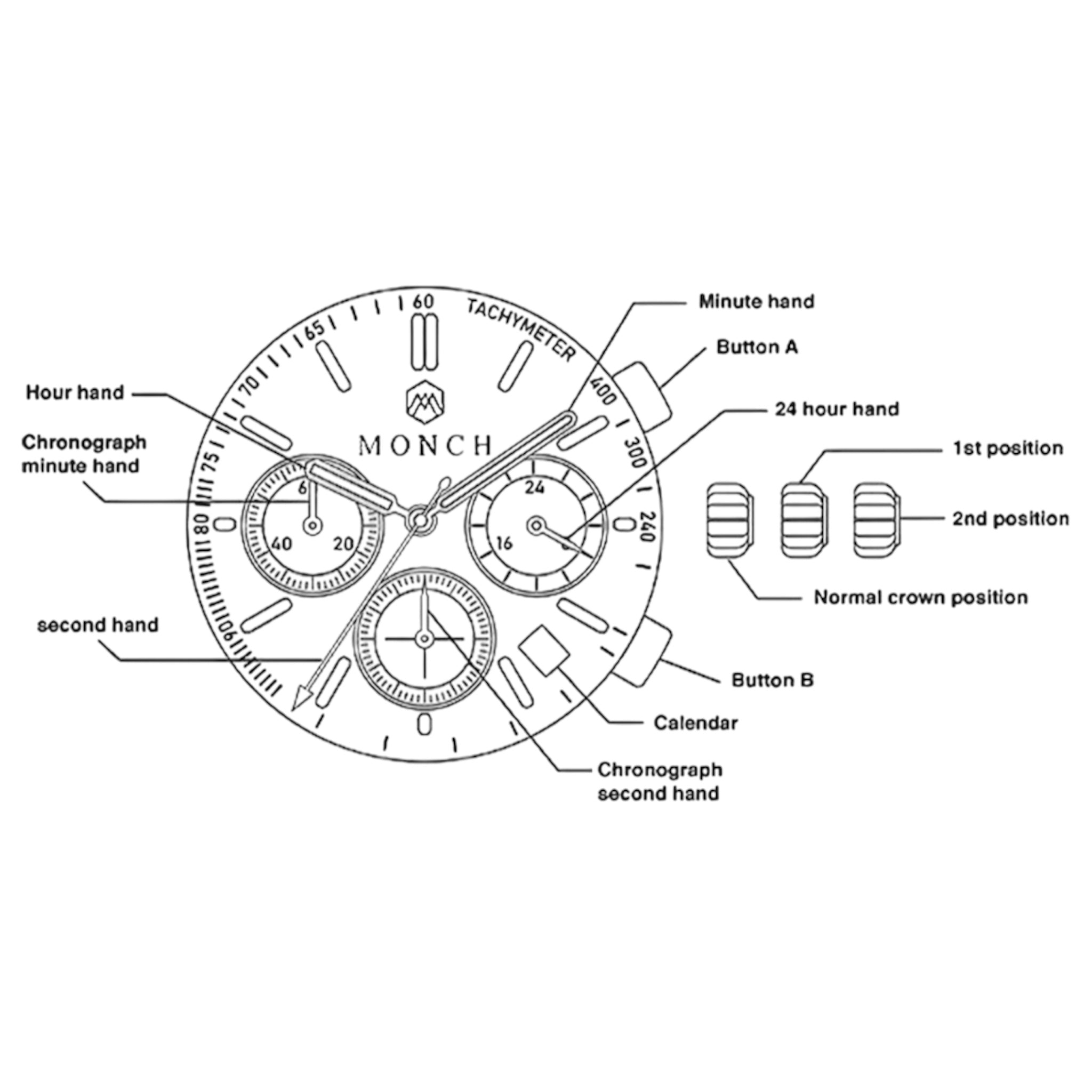
This movement features: hour, minute and central second hands; a 24-hour indicator; a chronograph (stopwatch) function up to 60 minutes and a date window.
Buttons & Crown Function Summary
| Control | Normal (Pushed) | 1st Click | 2nd Click |
|---|---|---|---|
| Crown | Run mode | Date setting | Time setting |
| Button A | — | Start / Stop | — |
| Button B | — | Reset | — |
Setting the time
- If the chronograph is running, press Button A to stop it, then set the hands back to “0” (12 o’clock) position if they aren’t already.
- Pull the crown out to the second click (time-setting). The second hand will stop.
- Rotate the crown to set hour and minute. Make sure the 24-hour dial matches AM/PM.
- Push the crown back to the normal (pushed-in) position. If your model has a screw-down crown, ensure it’s screwed in to maintain water resistance.
Setting the Date
1. Pull the crown out to the first click.
2. Rotate the crown clockwise to advance the date. Avoid setting the date between 9:00 PM and 1:00 AM, as this may interfere with the date change mechanism.
3.Push the crown back to the normal position.
Using the Chronograph
- Start/Stop measurement: Press Button A.
- Reset to zero: First stop the measurement with Button A, then press Button B.
- The stopwatch measures in 1-second increments, up to 60 minutes.
Zeroing the chronograph hands
If any chronograph hand does not return to the 12 o’clock (“0”) position after reset:
- Pull the crown out to the second click.
- Use Button A (or Button B/combination depending on model) to adjust the mis-aligned hand(s) until they point to zero.
- Push the crown back in and perform a stop → reset to confirm all hands return to zero.
Standard Maintenance & Precautions
- Always push the crown back in after setting to preserve water-resistance.
- Do not change the date when the watch time is between 9 PM and 1 AM.
- After a battery change, make sure to reset any mis-aligned chronograph hands to “0”.
- Keep buttons and crown clean; ensure the watch is not running the stopwatch before setting the time.
- For optimal accuracy: battery life is approx. ~2 to 3 years; maintain service as needed.
- Avoid strong chemicals & solvents
- Clean with a soft microfiber cloth
- Keep away from magnets

Water Resistance
5 ATM (50M)
Suitable For:
- Hand-washing
- Rain / splashes
- Swimming in shallow water
- Showering (cool water)
Avoid:
- Hot showers, saunas or steam rooms
- High-pressure water (jetskis, water guns)
- Pressing chronograph buttons underwater
- Diving or snorkelling
Always ensure the crown is fully pushed in.